4. Ajouter un pare-feu
4.1. UFW
Section intitulée « 4.1. UFW »Installation et configuration d’UFW (Uncomplicated Firewall) UFW est une interface conviviale pour gérer les règles de pare-feu sous Linux.
Vérifier l’état actuel :
sudo ufw statusPermet de s’assurer qu’UFW est installé et affiche s’il est actif ou non. Dans ce cas, l’état est “Inactive”, ce qui signifie que le pare-feu n’est pas encore activé.
Définir les règles par défaut :
sudo ufw default deny incomingsudo ufw default allow outgoingCes commandes définissent les règles de base :
- Refuser le trafic entrant : Bloque toutes les connexions entrantes sauf celles explicitement autorisées.
- Autoriser le trafic sortant : Permet toutes les requêtes sortantes depuis le serveur.
Autoriser le trafic entrant sur des ports spécifiques : Ces commandes ouvrent les ports requis pour les services essentiels :
sudo ufw allow sshsudo ufw allow httpsudo ufw allow https/tcpsudo ufw allow https/udp- Port 22 (SSH) : Nécessaire pour la gestion à distance.
- Port 80 (HTTP) : Permet aux visiteurs d’accéder aux pages web via HTTP.
- Ports 443 (HTTPS TCP/UDP) : Active la communication sécurisée via HTTPS. L’ouverture de ports spécifiques uniquement réduit la surface d’attaque du serveur.
Activer le pare-feu :
sudo ufw enableActive UFW pour appliquer les règles de pare-feu configurées.
Revérifier l’état :
sudo ufw statusAffiche les règles actives appliquées par UFW. Par exemple :
Status: active
To                         Action      From--                         ------      ----22/tcp                     ALLOW       Anywhere80/tcp                     ALLOW       Anywhere443/tcp                    ALLOW       Anywhere443/udp                    ALLOW       Anywhere22/tcp (v6)                ALLOW       Anywhere (v6)80/tcp (v6)                ALLOW       Anywhere (v6)443/tcp (v6)               ALLOW       Anywhere (v6)443/udp (v6)               ALLOW       Anywhere (v6)
Les ports listés et leurs protocoles (par exemple, TCP/UDP) confirment que les règles sont en place. Les règles IPv6 sont incluses si le serveur les prend en charge.
4.2. Pare-feu spécifique au fournisseur
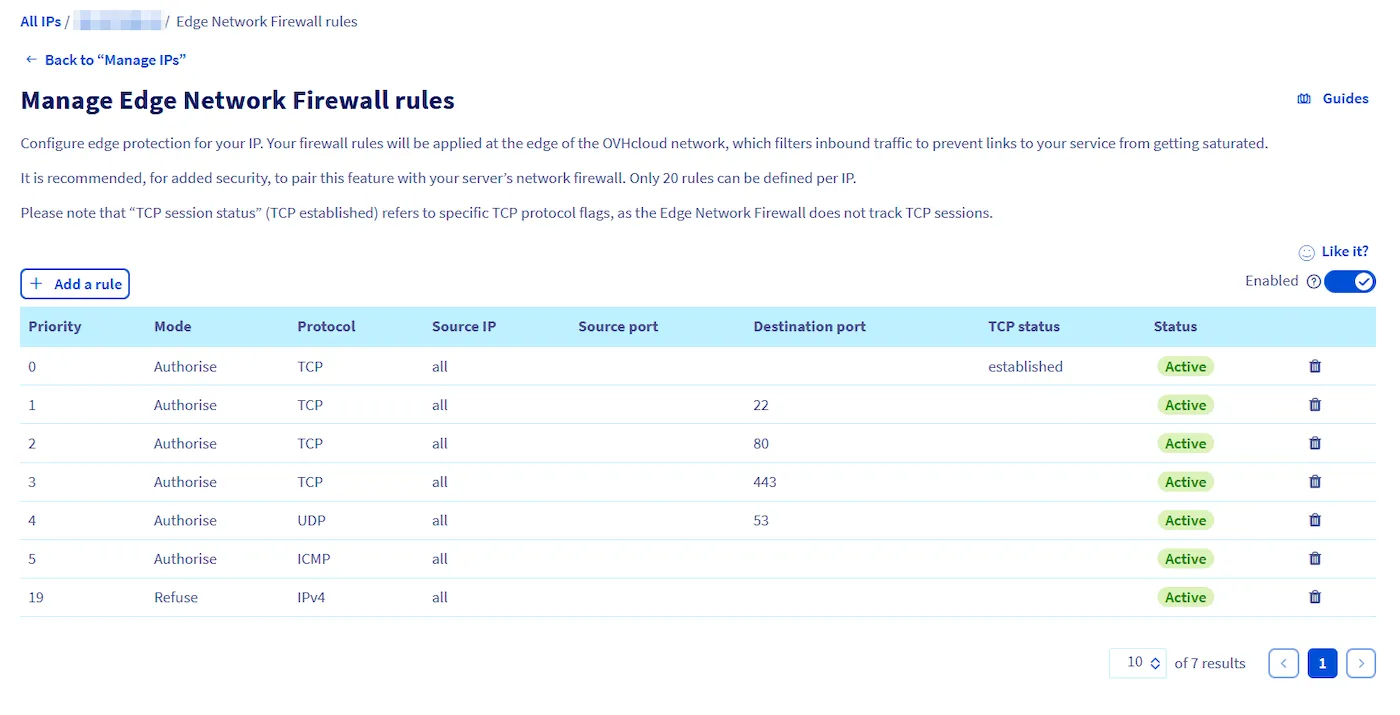
Section intitulée « 4.2. Pare-feu spécifique au fournisseur »De nombreux fournisseurs de serveurs cloud ou dédiés, comme OVHCloud, proposent des pare-feu intégrés. Ces pare-feu ajoutent une couche de protection supplémentaire en filtrant le trafic avant qu’il n’atteigne votre serveur.
Suivez les instructions sur : https://help.ovhcloud.com/csm/fr-dedicated-servers-firewall-network?id=kb_article_view&sysparm_article=KB0043455
- Configuration des règles de pare-feu : En suivant l’exemple OVHCloud :
- Garder les ports des services essentiels ouverts :
- SSH (22) : Pour la gestion à distance du serveur.
- HTTP (80) et HTTPS (443) : Pour le trafic web.
- UDP (53) : Courant pour la communication DNS.
- Autoriser ICMP : Utile pour les diagnostics (par exemple, ping).
- S’assurer que seuls les ports requis sont ouverts pour minimiser la vulnérabilité.
- Les pare-feu au niveau du fournisseur sont très efficaces car ils bloquent le trafic indésirable au niveau réseau (avant qu’il n’atteigne votre serveur).
4.2.1 Exemple de configuration
Section intitulée « 4.2.1 Exemple de configuration »Pour s’assurer que seuls les ports SSH (22), HTTP (80), HTTPS (443) et UDP (53) restent ouverts tout en autorisant ICMP, suivez les règles ci-dessous :